
Joyoshare UltFix for Mac4.6.0 - Download
You'll be able to download in few seconds.
Publisher Description
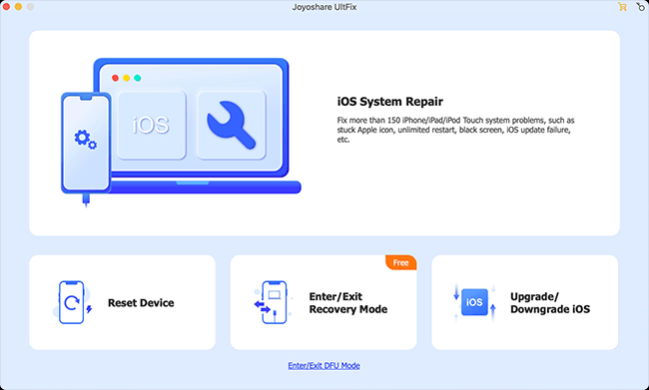
Have you ever encountered some iOS issues like iPhone stuck on the white Apple logo, recovery mode, black screen, etc.? Don't panic. Joyoshare UltFix can help you fix them with no worry about the risk of data loss in a few steps. Joyoshare Mac UltFix iOS System Recovery is an excellent utility to repair more than 150 kinds of common iOS system problems such as iPhone is disabled, stuck in spinning circle, white screen of death, frozen, stuck in boot loop, update failure, forgot lock screen passcode, etc. Compared with other general method such as iTunes restore, Joyoshare UltFix can easily fix these iOS issues without losing any data, which could be the magic of this program. Besides, Joyoshare UltFix iOS System Recovery is 100% secure and only you can access to your data and account. With a wide range of compatibility, this software gives fully support to almost all iOS models and versions including the newest iPhone 16 and iOS 18.
Key Features of Joyoshare UltFix for Mac:
1. Fix various iOS system issues by yourself;
2. Repair iOS problems without data loss;
3. Freely enter or exit the recovery mode in one click;
4. Upgrade and downgrade iOS without jailbreaking;
5. Permanently erase iOS data to protect privacy;
6. Repair iTunes and fix sync errors;
7. Explore the latest iOS Beta features;
8. Fully compatible with different iOS devices and systems including iPhone 16 and iOS 18.
About Joyoshare UltFix for Mac
This System Maintenance program is available in English, German, French, Japanese, Spanish, Chinese. It was last updated on 29 December, 2024. Joyoshare UltFix for Mac is compatible with the following operating systems: Mac.
The company that develops Joyoshare UltFix for Mac is JoyoShare. The latest version released by its developer is 4.6.0.
The download we have available for Joyoshare UltFix for Mac has a file size of 17.8 MB. Just click the green Download button above to start the downloading process. The program is listed on our website since 2024-12-24 and was downloaded 0 times. We have already checked if the download link is safe, however for your own protection we recommend that you scan the downloaded software with your antivirus. Your antivirus may detect the Joyoshare UltFix for Mac as malware if the download link is broken.
How to install Joyoshare UltFix for Mac on your Windows device:
- Click on the Download button on our website. This will start the download from the website of the developer.
- Once the Joyoshare UltFix for Mac is downloaded click on it to start the setup process (assuming you are on a desktop computer).
- When the installation is finished you should be able to see and run the program.
Program Details
General
System requirements
Download information
Pricing
Version History
version 4.6.0
posted on 2024-12-24
1. New function to explore iOS Beta features; 2. Added the anti-recovery erasure function; 3. Added a function to repair iTunes and sync errors.
version 4.5.0
posted on 2024-08-14
1. Support iOS system upgrade to iOS 18 beta.
version 4.3.0
posted on 2024-04-26
1. Support multi-language function; 2. Use the current system language as the default program language.
version 4.0.0
posted on 2022-11-04
1. Added new feature to reset device; 2. Added new feature to upgrade and downgrade iOS; 3. Added instructions to enter and exit DFU mode; 4. Optimized the feature of one-click enter/exit Recovery mode; 5. Optimized the program and fixed some bugs.
version 2.2.0
posted on 2019-12-06
1. Fixed an occasional issue where connected devices could not be found; 2. Fixed some minor bugs.
version 2.1.0
posted on 2019-09-30
1. Supported to downgrade system to an available low iOS version.
version 2.0.0
posted on 2019-07-22
1. Supported to fix different Apple TV system problems; 2. Fixed some minor bugs.
version 1.3.0
posted on 2019-06-06
1. Fixed a problem where the device could not be unlocked due to failed firmware package decompression.
Disclaimer
External Download
We do not host Joyoshare UltFix for Mac on our servers. We did not scan it for viruses, adware, spyware or other type of malware. This app is hosted by the software publisher and passed their terms and conditions to be listed there. We recommend caution when installing it.
The external download link for Joyoshare UltFix for Mac is provided to you by apps112.com without any warranties, representations or guarantees of any kind, so access it at your own risk.
If you have questions regarding this particular app contact the publisher directly. For questions about the functionalities of apps112.com contact us.
